How To Make A Solar Panel Follow The Sun
How to Make a Solar Panel Follow the Sun: Your DIY Guide to Maximizing Solar Power
Ever look at your solar panels and wonder if they could be doing more? If you’re using fixed panels, the answer is a resounding yes! The sun, our ultimate power source, doesn’t stay still. It arcs across the sky from sunrise to sunset, and if your panels aren’t moving with it, you’re leaving a significant chunk of potential energy on the table.
Table of Contents
- How to Make a Solar Panel Follow the Sun: Your DIY Guide to Maximizing Solar Power
- Why Bother? The Unbeatable Advantage of Sun Tracking
- The Efficiency Edge: More Power, Smarter Investment
- Understanding Solar Panel Orientation: Fixed vs. Tracking Systems
- The Core Concepts: How Solar Tracking Works
- Sensing the Sun: Light Dependent Resistors (LDRs) & Photoresistors
- Actuation: Moving Your Panels
- The Brains: Microcontrollers (Arduino/Raspberry Pi)
- DIY Solar Tracking Methods: Choose Your Path
- Passive Tracking
- Active Tracking (The DIY Sweet Spot)
- Single-Axis Tracking
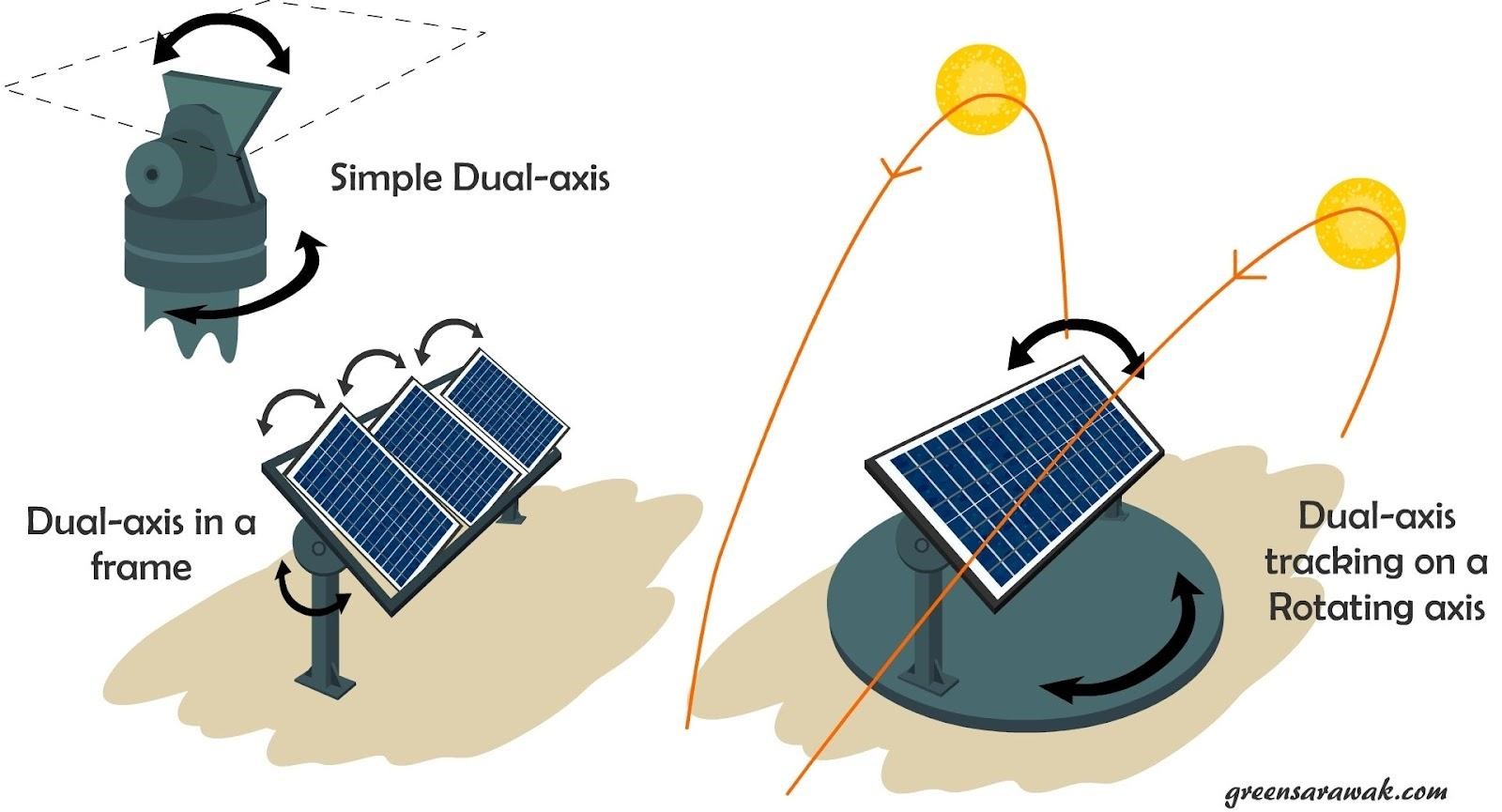
- Dual-Axis Tracking
- Manual Tracking
- Building Your Own Active Solar Tracker (Arduino-Based DIY Guide)
- Essential Components You’ll Need
- Step-by-Step Assembly: Let’s Get Building!
- 1. Prepare Your Mounting Structure
- 2. Mount the LDR Sensors
- 3. Wire the LDRs to Arduino
- 4. Connect the Actuator
- For a Servo Motor:
- For a Linear Actuator (requires L298N H-bridge driver):
- 5. Power Up Your System
- 6. Upload the Arduino Code
- Understanding the Arduino Code Logic
- Advanced Considerations & Optimizations
- Software Enhancements
- Powering the Tracker Itself
- Weatherproofing and Durability
- DIY vs. Commercial Solar Trackers: Is It Worth the Effort?
- Cost Savings vs. Effort
- Complexity & Reliability: The Trade-Offs
- Scalability: When DIY Might Not Be Enough
- Common Troubleshooting Tips for Your Solar Tracker
- Panel Not Moving or Moving Erratically
- Jittery Movement or Constant Adjustments
- Panel Moving the Wrong Way
- Power Drain Issues
- The Future of Solar Tracking: What’s Next?
- Final Thoughts: Embrace the Sun’s Full Potential
Imagine harnessing an extra 20%, 30%, or even 40% more energy from your existing solar setup. That’s not wishful thinking; that’s the power of a solar tracker. This guide isn’t just about *if you can make a solar panel follow the sun, but how you can build your own intelligent system to do just that, unlocking your panels’ true potential. We’ll dive into the mechanics, the electronics, and the code – giving you everything you need to become a sun-tracking pioneer.
Why Bother? The Unbeatable Advantage of Sun Tracking
When you invest in solar, you want the maximum return. Fixed solar panels are great, but they’re a compromise. They’re typically angled to capture the midday sun, meaning they’re suboptimal during morning and afternoon hours. This is where tracking comes in, turning your passive energy harvester into an active, intelligent power plant.
The Efficiency Edge: More Power, Smarter Investment
How much difference can a tracker make? The numbers are compelling:
- Single-axis trackers (tracking east to west) can boost energy production by 20-30% compared to fixed panels.
- Dual-axis trackers (tracking east-west and north-south) can push that gain to 30-45%, sometimes even more depending on your latitude and season.
Think about it: that’s almost like getting an extra panel or two without buying new panels. You’re optimizing the hardware you already have, making your entire solar investment work harder, longer, and more efficiently throughout the day.
Understanding Solar Panel Orientation: Fixed vs. Tracking Systems
A fixed solar panel system is exactly what it sounds like: panels installed at a static tilt angle and azimuth (direction) – usually south-facing in the Northern Hemisphere. While simple and robust, their output peaks for only a few hours around solar noon.
A solar tracking system, on the other hand, dynamically adjusts the orientation of the solar panel(s) throughout the day to maintain an optimal angle to the sun’s rays. This constant adjustment ensures maximum sunlight absorption, leading to significantly higher energy yields.
The Core Concepts: How Solar Tracking Works
At its heart, a solar tracker is a feedback loop: sense the sun’s position, move the panel, and repeat. Let’s break down the key components that make this possible.
Sensing the Sun: Light Dependent Resistors (LDRs) & Photoresistors
The eyes of your solar tracker are typically Light Dependent Resistors (LDRs), also known as photoresistors. These tiny, inexpensive components have a resistance that changes based on the intensity of light hitting them. More light means lower resistance, and less light means higher resistance.
By placing two or more LDRs strategically (e.g., separated by a small barrier), your tracker can determine which direction is brighter. If the LDR on the east side detects more light than the one on the west, it knows the sun is moving east, and the panel needs to turn that way.
Actuation: Moving Your Panels
Once your LDRs tell the system where the sun is, something needs to physically move the panels. This is the job of an actuator. For DIY projects, you’ll commonly encounter:

- Servo Motors: Great for smaller, lighter panels. They offer precise angular control within a limited range (e.g., 0-180 degrees). Easy to control with a microcontroller.
- Stepper Motors: Provide high torque and very precise, repeatable step-by-step movement. Good for slightly heavier loads, but require a stepper motor driver and more complex control code.
- Linear Actuators: These are like an electric piston, pushing and pulling. Ideal for heavier panels or multi-panel arrays, offering robust, linear motion. They require an H-bridge motor driver to reverse direction.
The Brains: Microcontrollers (Arduino/Raspberry Pi)
The microcontroller is the central processing unit of your tracker. It’s the ‘brain’ that:
- Reads the input from your LDR sensors.
- Compares the light intensity values.
- Calculates the necessary movement.
- Sends commands to the actuator to adjust the panel’s position.
- Can be programmed with logic for various scenarios (e.g., parking at night, handling clouds).
For most DIY projects, an Arduino Uno or a smaller Arduino Nano is an excellent, cost-effective choice due to its ease of use, vast community support, and robust I/O capabilities.
DIY Solar Tracking Methods: Choose Your Path
While the core concepts remain, the implementation can vary. Let’s look at the main types of trackers you might consider building or encountering.
Passive Tracking
Passive trackers use physical principles rather than electronics to follow the sun. They often involve fluids or materials that expand when heated by sunlight, shifting the panel’s weight and causing it to tilt. While elegantly simple and requiring no power, they are generally less precise and slower to react than active systems. They’re also less common for DIY builds due to the specialized components involved.
Active Tracking (The DIY Sweet Spot)
Active trackers are what we’re focusing on: they use sensors and motors to actively pursue the sun. This category is further divided by how many axes of movement they have.
Single-Axis Tracking
A single-axis tracker primarily moves your panel along one plane, most commonly from east to west to follow the sun’s daily path. This is simpler to build, requires fewer components, and is highly effective in increasing output, especially in summer months when the sun’s elevation changes less dramatically.
Dual-Axis Tracking
Dual-axis trackers offer movement in two planes: east to west (azimuth) and north to south (elevation). This allows the panel to always be pointed directly at the sun, regardless of the time of day or season. It yields the highest energy gains but is also more complex to design, build, and maintain due to the additional motor and control logic.
Here’s a quick comparison to help you choose:
| Feature | Single-Axis Tracker | Dual-Axis Tracker |
|---|---|---|
| Efficiency Gain (vs. Fixed) | 20-30% | 30-45% |
| Complexity (DIY) | Moderate | High |
| Cost | Lower | Higher |
| Components Needed | Fewer (1 motor, 2-4 LDRs) | More (2 motors, 4+ LDRs) |
| Best For | Beginners, smaller setups, maximizing daily sun. | Experienced DIYers, maximum yearly yield, larger setups. |
Manual Tracking
This is the simplest, most ‘DIY’ method possible. You physically go out and adjust your panel’s angle a few times a day. While it costs nothing but your time, it’s obviously not practical for anything but the smallest, most experimental setups. It’s a great way to experience* the benefits of tracking before committing to an automated system, though!
Building Your Own Active Solar Tracker (Arduino-Based DIY Guide)
For our DIY guide, we’ll focus on an active single-axis tracker using an Arduino Uno. This provides an excellent balance of performance, educational value, and manageable complexity for most home enthusiasts. It’s the most popular DIY approach for a reason.
Essential Components You’ll Need
Before you begin, gather these key components:
- Solar Panel(s): The star of the show! A small ~10-20W panel is ideal for testing.
- Arduino Uno (or Nano): The microcontroller ‘brain’.
- LDRs (Photoresistors) x 2-4: Your light sensors. Two for a simple setup, four for more directional precision.
- Resistors (10k ohm) x 2-4: To create voltage dividers with your LDRs.
- Servo Motor (e.g., SG90 or MG996R): For light panels, SG90 is fine. For heavier panels, use an MG996R or similar metal gear servo. If using a linear actuator, you’ll need an L298N H-bridge motor driver.
- Breadboard & Jumper Wires: For easy prototyping and connections.
- Mounting Structure: This is critical. It needs to securely hold your panel(s) and allow smooth, unhindered rotation. Wood, PVC, or 3D-printed parts are common DIY choices. Ensure it’s sturdy enough for your panel’s weight and able to withstand wind.
- Small Protoboard or PCB (optional): For a more permanent wiring solution once prototyped.
- Power Supply: A 9V battery or a regulated 5V power supply for the Arduino, and a separate power supply for the motor if it draws significant current (especially linear actuators).
- USB Cable (A-B): To program the Arduino.
Step-by-Step Assembly: Let’s Get Building!
Follow these steps to construct your single-axis solar tracker:
1. Prepare Your Mounting Structure
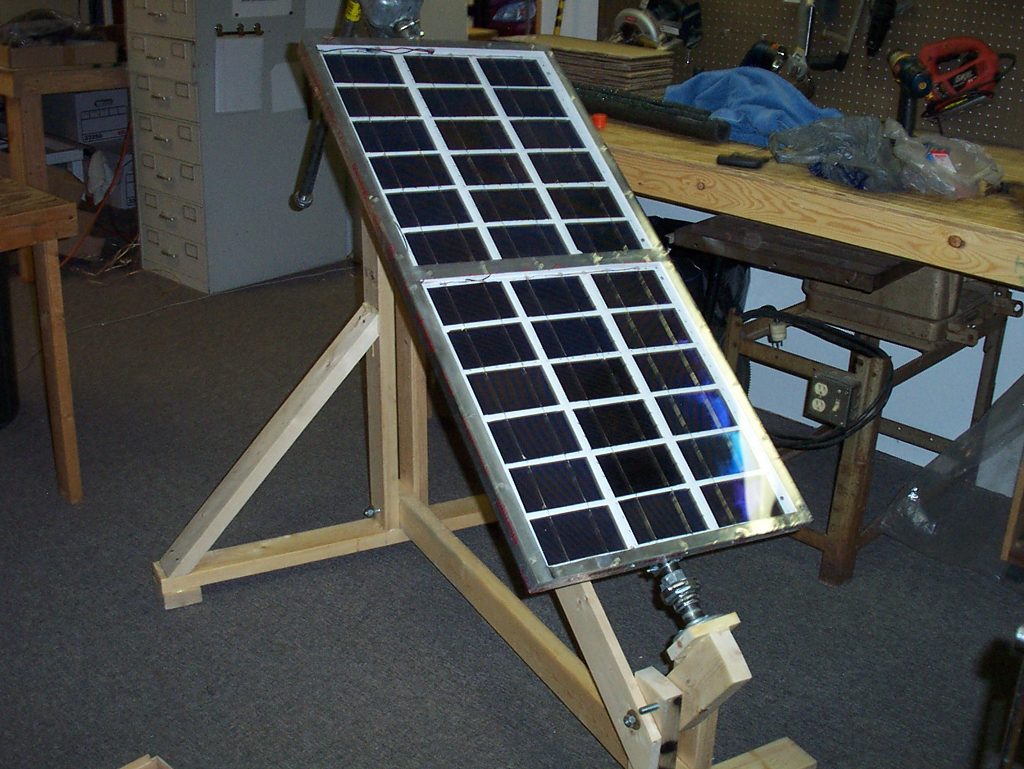
Your mounting structure is the backbone of your tracker. It needs to be stable and allow for smooth rotation. If you’re using a single servo for a small panel, you might design a bracket that attaches to the servo horn, allowing the panel to pivot. For heavier setups, a bearing or pivot point with a gear driven by a servo or linear actuator might be more appropriate. Securely attach your solar panel to this rotating part of the structure.
2. Mount the LDR Sensors
This is crucial for accurate tracking. You’ll need two LDRs for basic east-west tracking. Mount them side-by-side with a small, opaque divider between them. This divider ensures that one LDR is slightly shaded while the other receives more direct light when the panel isn’t perfectly facing the sun. Think of them as light ‘eyes’ that tell the panel to turn towards the brighter side. For example, place LDR1 on the left (east) and LDR2 on the right (west) with a small wall between them.
3. Wire the LDRs to Arduino
Connect each LDR in a voltage divider configuration. Here’s how:
- Connect one leg of LDR1 to 5V (Arduino’s 5V pin).
- Connect the other leg of LDR1 to an Analog Input Pin (e.g., A0) on the Arduino and also to one leg of a 10k ohm resistor.
- Connect the other leg of the 10k ohm resistor to GND (Arduino’s GND pin).
- Repeat this exact setup for LDR2, connecting it to a different Analog Input Pin (e.g., A1) and another 10k ohm resistor.
This setup allows the Arduino to read voltage values that vary with light intensity.
4. Connect the Actuator
For a Servo Motor:
- Connect the servo’s power wire (usually red) to the Arduino’s 5V pin.
- Connect the servo’s ground wire (usually brown/black) to the Arduino’s GND pin.
- Connect the servo’s signal wire (usually orange/yellow) to a Digital PWM pin on the Arduino (e.g., Pin 9 or 10).
For a Linear Actuator (requires L298N H-bridge driver):
- Connect the L298N’s VCC pin to an external power supply (matching your actuator’s voltage, e.g., 12V).
- Connect the L298N’s GND pin to the external power supply’s GND and also to the Arduino’s GND (common ground).
- Connect the actuator’s two wires to the L298N’s OUT1 and OUT2 terminals.
- Connect L298N’s IN1 and IN2 pins to two digital pins on the Arduino (e.g., Pin 2 and Pin 3). These pins will control the direction of the actuator.
5. Power Up Your System
Connect your Arduino to your computer via USB (this will also power it). If you’re using an external power supply for your actuator, ensure it’s connected and providing the correct voltage. Always double-check your wiring before applying power!
6. Upload the Arduino Code
This is where the magic happens. You’ll write or adapt code (a ‘sketch’ in Arduino terms) that tells the Arduino what to do. The basic logic is as follows:
- Read the analog values from LDR1 (east) and LDR2 (west).
- Compare these values.
- If LDR1 (east) detects more light, the sun is to the east; move the panel slightly eastward.
- If LDR2 (west) detects more light, the sun is to the west; move the panel slightly westward.
- Implement a ‘dead band’ or threshold: if the difference between LDRs is very small, don’t move the panel. This prevents jittery movement and saves power.
- Include ‘night mode’ or ‘park’ function: at night, move the panel to a sunrise-ready position (e.g., fully east).
Understanding the Arduino Code Logic
The Arduino code, often called a ‘sketch,’ is the intelligence behind your tracker. Here’s the core logic you’d implement:
- Initialization: Set up the servo motor library (if using a servo), define pin assignments for LDRs and the servo/actuator control pins.
- Loop Function: This is where the continuous action happens.
- Read Sensor Values: Use
analogRead(LDRPIN)to get values (0-1023) from each LDR. - Calculate Difference: Subtract the value of the ‘west’ LDR from the ‘east’ LDR.
- Apply Threshold/Dead Zone: If the absolute difference between the LDR readings is less than a predefined threshold (e.g., 10-20 units), do nothing. This prevents the panel from constantly adjusting for minor light fluctuations or sensor noise.
- Determine Direction and Adjust:
- If East LDR value is significantly higher, the sun is to the east. Command the servo to move a small increment towards the east.
- If West LDR value is significantly higher, the sun is to the west. Command the servo to move a small increment towards the west.
- Boundaries: Ensure the servo’s movement stays within its physical limits (e.g., 0-180 degrees).
- Night Parking (Optional but Recommended): Add logic to detect low light conditions (e.g., both LDRs read very low values). When dark, move the panel to an optimal sunrise position (e.g., full east) to be ready for the next day.
- Delay: Introduce a small delay (e.g., 50-1000 milliseconds) at the end of the loop to prevent rapid, unnecessary adjustments and reduce power consumption.
- Read Sensor Values: Use
While a full code example is beyond the scope of this text, searching for ‘Arduino LDR servo solar tracker code’ will yield many excellent open-source examples you can adapt. Focus on understanding the logical flow before diving into the specific syntax.
Advanced Considerations & Optimizations
Once you have a basic tracker working, you might want to consider these enhancements:
Software Enhancements
- Calibration: Fine-tune your LDR thresholds and movement increments for optimal responsiveness.
- Nighttime Parking: As mentioned, program your panel to return to an east-facing position at sunset, ready for the next dawn.
- Cloud Detection/Overcast Mode: If both LDRs show consistently low, similar readings, it might be cloudy. In this case, the tracker could either ‘park’ or move to a general optimal position to avoid futile adjustments.
- Error Handling: What happens if the motor gets stuck or a sensor fails? Simple error detection can prevent damage.
- Time-Based Tracking: Combine LDR tracking with a Real-Time Clock (RTC) module. The RTC can provide a basic daily path, and LDRs can fine-tune it. This is more robust against temporary shading.
Powering the Tracker Itself
Your tracker consumes a small amount of power. For off-grid systems, you’ll want this to be minimal. You can:
- Use a small fraction of the main solar panel’s output: If your main panel charges a battery, you can draw power for the Arduino and motors from that battery.
- Dedicated small solar panel: A very small, separate solar panel and battery exclusively for the tracker ensures it doesn’t draw from your main power output.
- Sleep modes: Program the Arduino to enter low-power sleep modes during periods of inactivity (e.g., at night, or when the sun is perfectly centered).
Weatherproofing and Durability
Your outdoor tracker will face the elements. Consider:
- Enclosures: House your Arduino and wiring in a waterproof enclosure (IP-rated junction box).
- Sealed Motors: Use outdoor-rated servos or linear actuators.
- Corrosion Protection: Use stainless steel hardware and treat wooden components.
- Wind Resistance: Ensure your mounting structure is robust enough to handle high winds, especially with the added surface area of a tilted panel.
DIY vs. Commercial Solar Trackers: Is It Worth the Effort?
This is a big question. While building your own tracker is incredibly rewarding and educational, it’s not always the right choice for everyone or every situation.
| Feature | DIY Solar Tracker | Commercial Solar Tracker |
|---|---|---|
| Cost | Generally much lower (component cost only). | Significantly higher (includes R&D, manufacturing, installation, warranty). |
| Complexity | High time investment, requires electronics/programming knowledge. | Low for end-user, professional installation. |
| Reliability & Durability | Depends entirely on build quality, component choice, and weatherproofing. | Engineered for outdoor conditions, tested, often with warranties. |
| Scalability | Best for small, single-panel or micro-array systems. | Designed for large-scale residential, commercial, and utility projects. |
| Maintenance | DIY troubleshooting and repairs. | Professional service, readily available parts. |
| Learning Curve | Steep, but highly educational. | Minimal for the owner. |
Cost Savings vs. Effort
If you’re tracking a single, small panel for an RV, shed, or experimental setup, the cost savings of DIY can be substantial. You’re paying for components, not labor or R&D. However, for a multi-panel home system, the engineering complexity, durability requirements, and potential for downtime might make a commercial solution a more pragmatic choice.
Complexity & Reliability: The Trade-Offs
DIY trackers often mean troubleshooting and iterating. They’re fantastic learning tools, but they might not have the ‘set it and forget it’ reliability of a professionally engineered and installed commercial system. For critical power needs, the proven reliability of commercial options usually outweighs the DIY cost savings.
Scalability: When DIY Might Not Be Enough
Trying to DIY a tracker for a dozen large residential panels can quickly become overwhelming and potentially unsafe. The forces involved are significant, requiring robust mechanical engineering beyond typical hobbyist capabilities. DIY shines for smaller, independent systems where hands-on learning and customization are valued.
Common Troubleshooting Tips for Your Solar Tracker
Even the best-laid plans can hit snags. Here are some common issues and how to approach them:
Panel Not Moving or Moving Erratically
- Check Wiring: A loose connection is the most common culprit. Double-check all jumper wires, especially to the Arduino’s 5V, GND, and signal pins.
- Power Supply: Is your servo/actuator getting enough power? Often, the Arduino’s 5V pin can’t provide enough current for larger motors, leading to weak or no movement. Use a separate power supply for the motor, ensuring a common ground with the Arduino.
- Code Logic: Re-read your code. Are your LDR values being read correctly? Are the comparison logic and movement commands correct? Print LDR values to the Serial Monitor to debug.
- Actuator Issues: Is the servo/actuator physically constrained? Is it strong enough for the panel’s weight? Test the motor independently to rule out a faulty component.
Jittery Movement or Constant Adjustments
- LDR Sensitivity & Threshold: Your LDRs might be too sensitive. Increase the ‘dead band’ threshold in your code (the minimum difference between LDR readings required for movement).
- Sensor Placement: Ensure the divider between LDRs is effective. Too small a divider, or no divider, can lead to ambiguous readings.
- Delay in Code: Add a small delay (e.g.,
delay(100);) at the end of your Arduino loop to give the system time to stabilize before the next reading.
Panel Moving the Wrong Way
- LDR Placement: You might have swapped the east/west LDRs or wired them incorrectly. Verify which LDR corresponds to which side in your code.
- Motor Direction: Your motor’s direction in code might be inverted. If it’s moving west when it should go east, reverse the `moveright()` and `move_left()` logic or the servo angle increments.
Power Drain Issues
- Actuator Size: A powerful motor consumes more power. Is your actuator oversized for the task?
- Sleep Modes: Implement sleep modes for the Arduino and motor driver during periods of low light or no movement.
- Inefficient Code: Constantly running loops and rapid adjustments consume more power. Optimize your code for efficiency.
The Future of Solar Tracking: What’s Next?
Solar tracking technology continues to evolve. We’re seeing more sophisticated algorithms that predict the sun’s path based on GPS and time, combined with sensor fine-tuning. Machine learning is also starting to play a role, allowing trackers to learn optimal movements based on historical weather patterns. For DIYers, new, cheaper, and more powerful microcontrollers and sensors are constantly emerging, making even more advanced projects accessible.
Final Thoughts: Embrace the Sun’s Full Potential
Building your own solar panel tracker is a fantastic project that blends electronics, mechanics, and programming. It’s a hands-on way to deepen your understanding of renewable energy and significantly boost the output of your solar panels. Whether you’re aiming for maximum efficiency for an off-grid cabin or simply want to experiment with smart energy solutions, a DIY solar tracker puts more power (literally!) in your hands. So, grab your Arduino, fire up your soldering iron, and let’s get those panels chasing the sun!
Frequently Asked Questions
How much more power can a solar tracker generate compared to a fixed panel?
A single-axis solar tracker can increase energy production by 20-30%, while a dual-axis tracker can boost output by 30-45% or more, depending on location and season, by constantly optimizing the panel’s angle to the sun.
What are the main components needed to build a DIY solar tracker?
You’ll primarily need a solar panel, a microcontroller (like an Arduino Uno), light-dependent resistors (LDRs) for sensing, a motor (servo or linear actuator) for movement, resistors, a breadboard, jumper wires, and a sturdy mounting structure.
What’s the difference between single-axis and dual-axis solar trackers?
Single-axis trackers move panels along one plane, typically east to west, optimizing for the sun’s daily path. Dual-axis trackers move panels along two planes (east-west and north-south), allowing them to point directly at the sun at all times, leading to greater efficiency gains but higher complexity.
Is building a DIY solar tracker worth the effort for a large home system?
For large residential systems, the complexity, durability, and safety requirements often make commercial solar trackers or a well-optimized fixed system a more reliable choice. DIY trackers are generally best suited for smaller, experimental, or off-grid setups where learning and cost savings are primary goals.
How does an LDR (Light Dependent Resistor) help a solar panel track the sun?
LDRs change resistance based on light intensity. By placing two or more LDRs with a divider, the tracker’s microcontroller can compare their readings. If one LDR detects more light, the system knows which direction to move the panel to face the sun directly.
What should I do if my DIY solar tracker isn’t moving correctly?
First, check all wiring for loose connections. Ensure your motor has adequate power (often requiring a separate supply from the Arduino). Review your Arduino code for logical errors, and consider debugging by printing LDR values to the serial monitor. Also, check for physical obstructions to the motor’s movement.


Post Comment